
Membership management
Membership management for tennis clubs, from application to self-service
e-MasterClub covers the full member lifecycle: multi-person applications with SEPA and a digital signature, document uploads, a status workflow with reminders and cancellations, structured import, and a self-service area for members.
- Multi-person applications with SEPA and digital signature
- Status workflow with reminders and a guided cancellation process
- Structured import with mapping, preview, and self-service for members
Digital application
Structured import
Self-service
Processes, permissions, and rules in one interface
What is membership management for a tennis club?
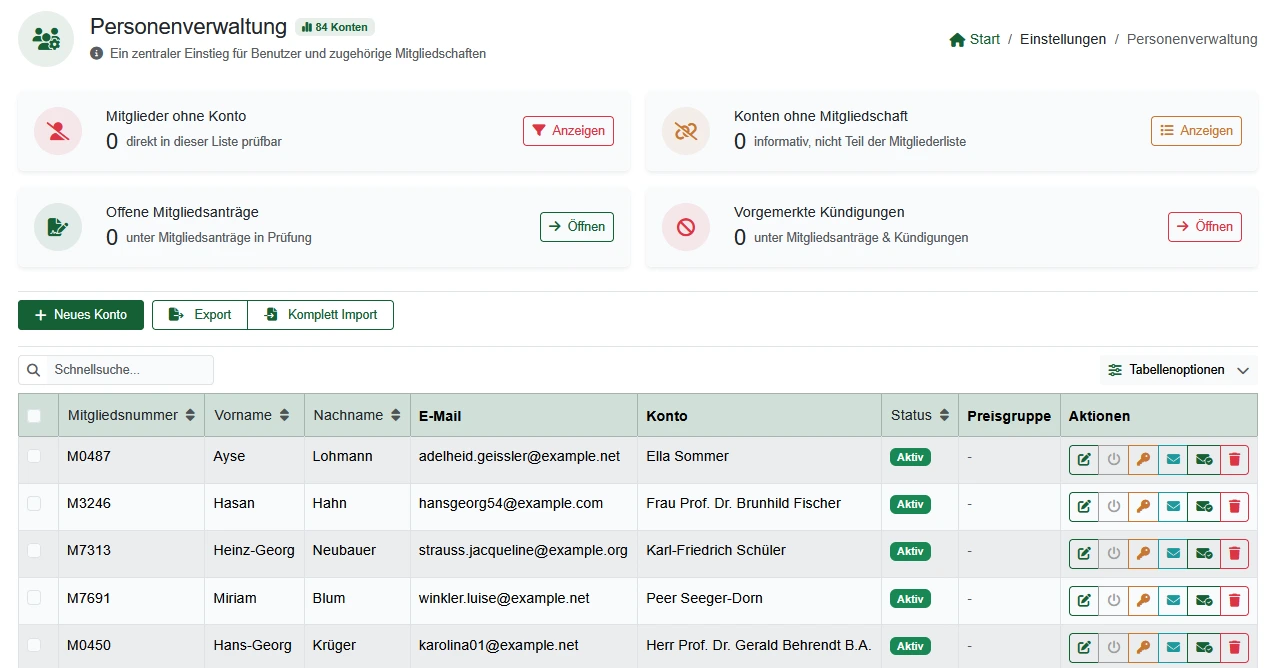
Membership management is the software that runs a club's member lifecycle end to end: a digital application, including multi-person and family applications with a SEPA mandate and a digital signature, document uploads, a role-based approval workflow with reminders, a guided cancellation process, and structured import for existing member lists with mapping and a preview. Members can manage parts of their own data through self-service, while the office filters and searches central, current records grouped by department or membership type.
Where membership administration costs time today
Without a structured process, applications, approvals, cancellations, and old member data all become manual work for the same few people.
Applications arrive scattered
A form here, an email there, a phone call in between. Someone has to collect it all by hand before a membership can even be reviewed.
Approval and cancellations have no clear owner
Without a defined workflow, it is unclear who approved a membership, who processed a cancellation, and when.
Old member lists are a manual migration project
Re-typing years of spreadsheet history by hand is slow and error-prone, and there's no way to check the result before committing.
The digital application, in detail
From a single applicant to a whole family, with SEPA and signature captured up front.
Digital membership application
Interested members fill out a structured form online instead of sending scattered emails or paper forms.
Multi-person and family applications
A whole family can apply together, with family relationships and a designated family payer recorded on the account.
SEPA mandate at application
A SEPA mandate can be captured as part of the application, so dues collection is set up from the start.
More about club billingDigital signature
A signature can be captured electronically on the application, where your club's process requires one.
Documents and proofs
Supporting documents and proofs are attached directly to the application or the member record.
Role-based approval workflow
The board or office reviews applications and approves them explicitly, so it is always clear who decided and when.
Approval, cancellation, and consent
What keeps the membership lifecycle moving after the application arrives.
Status workflow with reminders
Open steps in the application or approval process trigger reminders, so nothing sits untouched.
Guided cancellations
A cancellation runs through its own status workflow, documented like the application, instead of an email that's easy to lose track of.
Versioned GDPR consent
Every consent is tied to a specific text version, giving the board a documentable record of what each member agreed to.
Departments and membership types
Members are grouped by department or membership type, which then feeds dues and booking rules automatically.
More about club billingData: import, search, and self-service
Getting existing data in, and keeping current data usable.
Structured import
Existing spreadsheet columns are mapped to the right fields, with a preview before anything is committed.
Filters and search
Find members by status, department, membership type, or other criteria instead of scrolling a long list.
Self-service for members
Members view and update their own data and see their membership status, reducing requests to the office.
Central, current member records
Contact details and membership status live in one place instead of being copied across several lists.
Member records connect directly with court booking and club billing. See the full picture on the features overview.
Frequently asked questions about membership management
Direct answers about applications, approvals, import, and self-service.
A prospective member fills out a structured online form, including a SEPA mandate and a digital signature capture where your club requires it. The application arrives with the board or office for review, and only becomes an active membership after an explicit approval step.
Yes. Multi-person applications cover family memberships, with family relationships and a designated family payer recorded on the account.
The application can capture a signature electronically, but this does not automatically constitute a qualified electronic signature under eIDAS. Whether it is sufficient for your club's purposes is a decision for your board.
Yes. Supporting documents and proofs can be attached to an application or a member record instead of being collected separately by email.
Approval rights are assigned by role, and the status workflow sends reminders for applications or steps that are still open, so nothing sits untouched.
A cancellation runs through a defined workflow with its own status, so it is documented like the application itself, instead of an email that's easy to lose track of.
A structured import lets you map your existing spreadsheet columns to the right fields and preview the result before anything is committed, instead of re-typing every member by hand.
Yes. Filters and search let the office find members by status, department, membership type, or other criteria without scrolling through the full list.
A self-service area lets members view and update their own data and see their membership status, reducing requests that would otherwise land with the office.
Consents are versioned. The system records which version of a consent text a member accepted and when, so the board can prove what was agreed to at any point in time.
Yes. Members can be grouped by department or membership type, which is also the basis for dues and booking rules elsewhere in the system.
Next step
See the digital membership application live
Request a demo and check how the application, import, and self-service would work for your club.