

Club app · included in every plan
The tennis club app your members install from the browser
Members put the club portal on their home screen and book courts, reply to events and read club news on the go. Every club gets its own app with its name and logo, without a store release.
- iPhone and Android, installed from the browser
- Club name, logo and colours on the home screen
- Same data as the club administration
- Court booking
- Push notifications
- Membership card
Processes, permissions, and rules in one interface
Is there an app for the members of a tennis club?
Yes. e-MasterClub runs as an installable web app (PWA): members open the club portal on their phone and add it to the home screen. The app starts with the name, logo and colours of the club and shows the same data the board manages: court bookings, events, news, the membership card and the member profile. Updates arrive automatically, because there is no store version to update.
Limits: no native app in the App Store or on Google Play. Without a connection, the app shows a notice; bookings are not stored on the phone and not sent later. Push notifications require the setup by the club and the consent of the member.
What members do in the club app
The everyday tasks of club life, one tap from the home screen.
Book a court
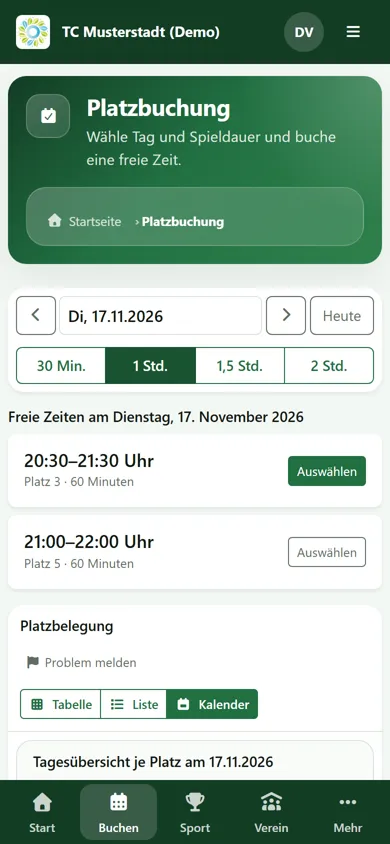
Pick the day and playing time, see free slots per court and book for yourself and your partners. The club rules are checked before the booking is saved.
My bookings
Upcoming courts with partners at a glance, including training sessions. Cancel within the club’s cancellation window or report a court problem.
Events and replies
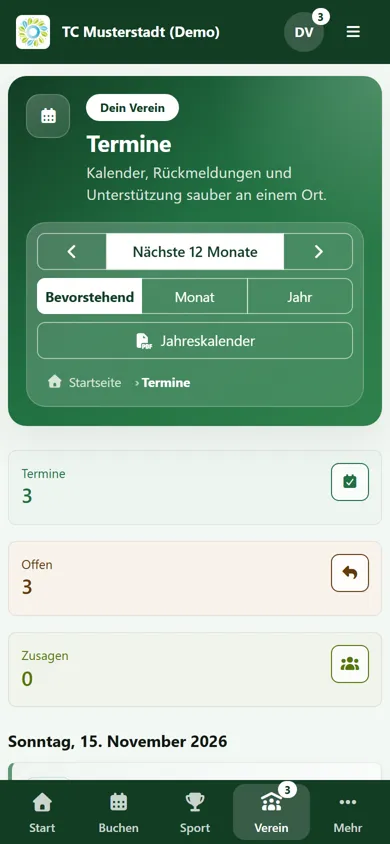
Club events in one calendar, with a reply in one tap instead of counting answers in a chat group.
Club news
Announcements from the board and teams in the app, optionally as a push notification on the phone.
Membership card
Digital membership card and an overview of the own memberships, ready to show at the clubhouse.
Profile and family
Members keep their contact details up to date and manage family members, so the office does not have to.
Installed in three steps
No store account, no download link to send around.
1. Open the club portal
Members sign in to the club portal in the browser on their phone, as they would on a computer.
2. Follow the hint
The member dashboard explains the installation: an install button on Android, the Share and Add to Home Screen steps on iPhone. “Later” pauses the hint for 14 days.
3. Start like an app
The club icon is on the home screen. The app opens in its own window on the member dashboard with quick access to bookings, news, events and profile.
How the club app looks on the phone
Screenshots from a demo club with synthetic data.

Web app or store app: what changes for the club?
| Question | e-MasterClub web app | Typical store app |
|---|---|---|
| Installation | from the browser, no store account | download from App Store or Google Play |
| Updates | automatic with the next start | via store update on each phone |
| Name and logo | those of your club | often the name of the provider |
| Push notifications | yes, with consent of the member | yes, with consent of the member |
| Use on a computer | same portal in every browser | separate web version needed |
The app shows what the club manages in court booking, membership management and club communication. Sign-in with a passkey and two-factor protection are explained under security and privacy.
Frequently asked questions about the club app
Direct answers about installation, costs and notifications.
No. e-MasterClub is an installable web app (PWA). Members open the club portal in their browser and add it to the home screen. It then starts in its own window with the name and logo of the club, without a store download.
Yes. On Android, the member dashboard offers an install button. On iPhone and iPad, it shows the three steps Share, Add to Home Screen and Add. Browsers without an install option simply keep using the portal as a website.
No. The installable web app is included in every plan. What members see in it depends on the modules the club uses, for example training or volunteer work hours.
The app shows a notice that there is no connection, and entries on the open page are kept. Bookings and other changes are not stored on the phone and not sent later; they need a connection, so nobody books a court that is already taken.
Yes, if the club has set up push notifications and the member agrees on their device. Members choose which categories they want, and they can turn notifications off again at any time.
Next step
Try the club app on your own phone
In the demo you install the app on your phone and book a court in the demo club.