Team management · in Advanced and Pro Plus

Tennis team management: availability, line-ups and match days in one place

e-MasterClub organizes the season of your club teams: players reply to fixtures, captains set the line-up, the match day comes with venue, meeting time and car pools, and shared costs go into a team kitty. Included in Advanced and Pro Plus.

  • Availability replies and line-up instead of group chat
  • Match day with venue, route, meeting time and car pools
  • Team kitty and season registration assistant
  • Captains and players
  • Car pools
  • Fixture import (WTB)
Direct answer

How can a tennis club organize its teams digitally?

A tennis club organizes its teams digitally by moving availability, line-ups and match-day details out of group chats into one shared team area. In e-MasterClub, players confirm or decline each fixture, the captain sets the line-up from the available players, and the match day shows venue, route, meeting time and car pools. Shared expenses are recorded with receipts in a team kitty, and before the next season a registration proposal is created from the players' check-ins.

Limits: included in Advanced and Pro Plus, switched on per club. Automatic fixture import currently only for the WTB (Germany); other leagues via calendar file or manual entry. The team kitty is an overview of shared costs, not a payment function.
Everyday problem

Where the team season costs captains time

A team of six to eight players with weekly fixtures creates a lot of small coordination work, most of it in chats.

Availability is collected in group chats

Who can play on Saturday gets lost between messages, and the captain ends up asking each player individually.

Away days are organized ad hoc

Venue, meeting time and who drives with whom are agreed at short notice, often by the same two people every week.

Shared costs are settled by hand

Balls, food or travel costs are paid by one person and split later on a note or in a spreadsheet.


Funktionsübersicht

A fixture, step by step

From the first reply to the shared costs after the match.

1. Players reply

Each player confirms or declines for the fixture. Optional reminders go to anyone who has not replied yet.

2. Captain sets the line-up

The team leadership plans the line-up and rotation from the available players. Players see the plan and their role.

3. Match day is prepared

Venue from the venue directory, route link, meeting and departure time with calculated drive time, plus a checklist.

4. Car pools

Drivers offer free seats with a starting point and their own times, and teammates pick a ride.

5. Reminders and changes

Players get a match-day reminder with the line-up and are notified about changes.

6. Team kitty

Expenses are recorded with a receipt and split across players who confirmed or were in the line-up.


Funktionsübersicht

Season, federation data and team registration

What the sports director maintains around the teams.

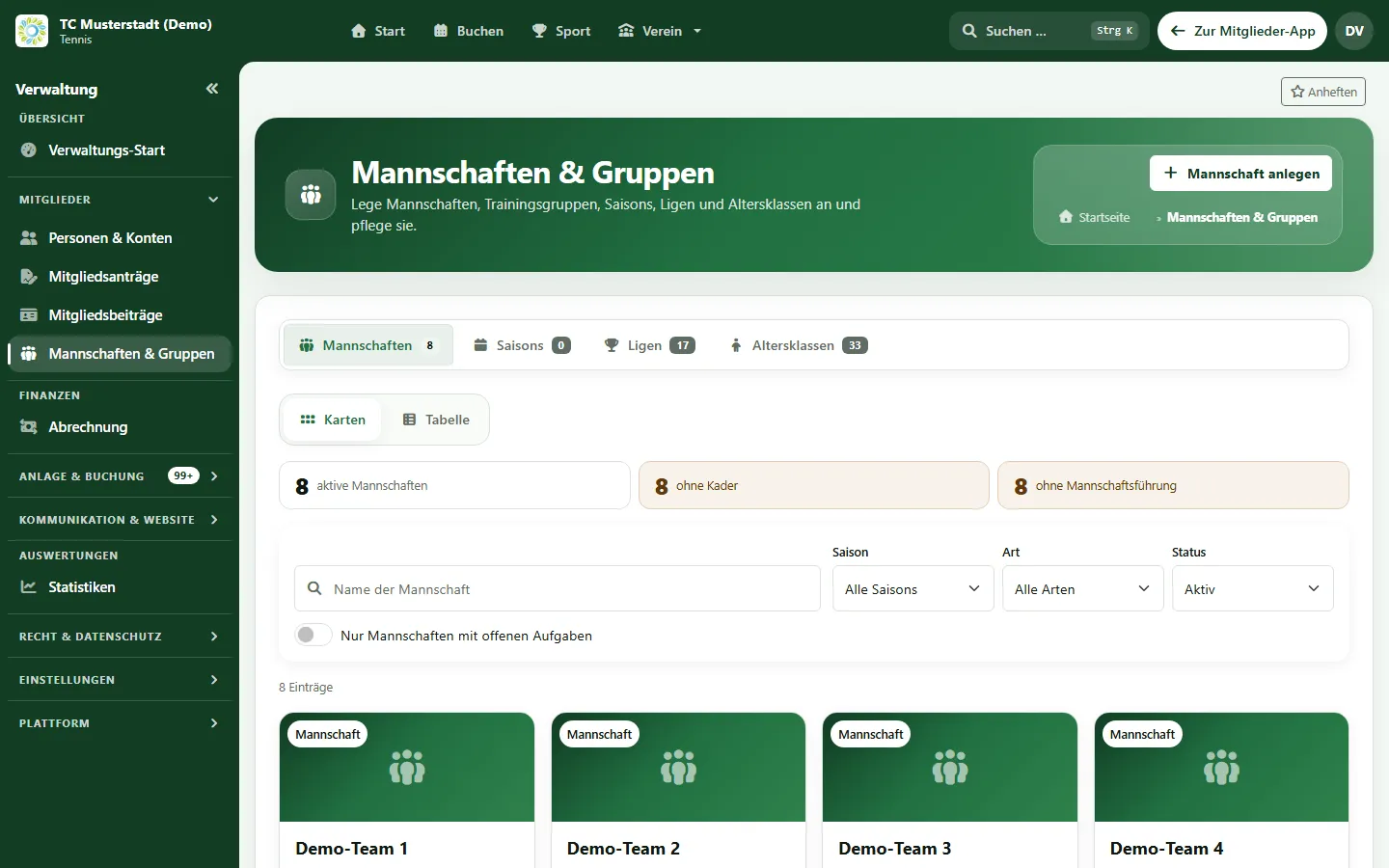
Teams and groups overview with seasons, leagues and age groups in the club administration (sample data)

Teams, seasons and squads

Teams, training groups, seasons, leagues and age groups are maintained in the club administration and linked to member records.

Fixtures and calendar

Fixtures appear in the team area, and players can subscribe to the team calendar on their phone.

Fixture import from the federation

For WTB leagues, fixtures, the league table and venues with addresses are imported. Other federations: import via calendar file (ICS).

Season record and table

For WTB leagues, each team shows its season record and league standing from the federation import.

Season check-in

Before the season, players say whether and in which team they want to play next season.

Team registration assistant

A registration proposal is created according to your club rules. The sports director checks, adjusts, approves and exports it as a list.

Roles

Who does what in team management

Each role sees the information it needs.

Captains

See availability at a glance, plan the line-up and rotation, prepare the match day and manage the team kitty.

Players

Reply to fixtures, see the line-up and match-day details, offer or choose a ride and give their season check-in.

Sports directors

Maintain teams and seasons, keep an eye on open tasks across teams and prepare the team registration.

Teams use the same membership data as the rest of the club, training groups are planned in training management, and home matches can reserve courts in court booking. See all modules on the features overview.

FAQ

Frequently asked questions about team management

Direct answers about replies, line-ups, match days and federation data.

Team management covers the season of a club team: fixtures, availability replies from players, the line-up, match-day organization with venue, meeting time and car pools, a team kitty for shared expenses, and the registration of teams for the next season.

No. Team management is included in Advanced and Pro Plus. Team and squad master data is part of the regular club administration in every plan.

A direct federation import is currently available for the WTB (Württemberg Tennis Federation in Germany): fixtures, league table and venues with addresses. Leagues of other federations can be brought in via a calendar file (ICS) where the federation provides one.

Each player confirms or declines for a fixture in the app. The captain sees at a glance who is available. Reminders for missing replies can be switched on per team and are off by default.

The team leadership plans the line-up and rotation. Players see the match-day plan and their own role, but cannot change the rotation.

Players offer a ride with free seats, a starting point and their own departure time, and others choose a seat. The match day also shows the venue, a route link, the meeting time and a checklist.

Yes. The team kitty records expenses with receipts and splits them across the players who confirmed or were in the line-up. This is a team-internal overview, not a payment function.

The team workflow itself (availability, line-up, match day, car pools, team kitty) works regardless of the league. Automatic fixture import is limited to the WTB; other fixtures are entered manually or imported from a calendar file.

Next step

See team management live

Request a demo and check how replies, line-ups, match days and the team kitty would work for your teams.

Request a demo View plans
No obligation No credit card