
Security and privacy
Security and data protection for club data
A tennis club manages addresses, bank details and proof documents for reduced fees. e-MasterClub protects sign-ins with a two-factor policy and passkeys, limits access with roles, and documents consent and deletion.
- Two-factor policy in four levels and passkeys
- Roles and permissions for every club office
- Versioned consent, retention rules and account deletion
- Passkeys
- Two-factor policy
- Own database per club
Processes, permissions, and rules in one interface
How secure is member data in tennis club software?
Member data are protected when sign-ins are secured, access is limited to the people who need it and consent is documented. In e-MasterClub, each club has its own installation and database, the club can require two-factor authentication or passkeys for administrative roles, and eleven roles separate what the board, treasurer and coaches see. Consent is stored with the version of the legal text, and retention rules show which data are due for deletion.
Limits: no security certification is claimed. Legal texts are templates that the club reviews. Actual deletion under retention rules is switched off by default.
Secure sign-in and access
Who may sign in, how, and what they see afterwards.
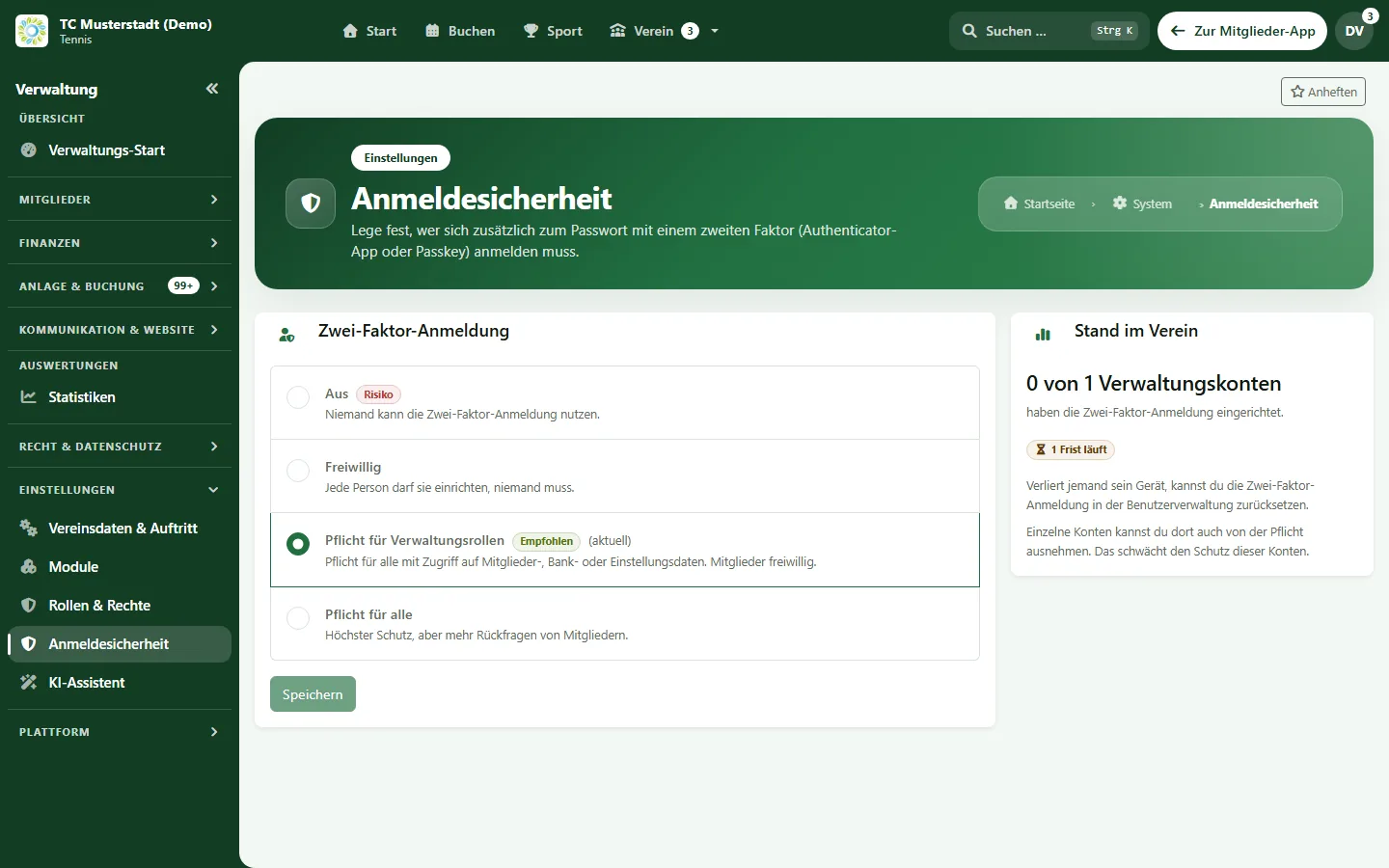
Two-factor policy
Four levels from off to required for everyone. Individual exceptions are possible, and the last remaining second factor is protected from accidental removal.
Passkeys
Sign in with a passkey on the phone or computer instead of a password, or use it as a second factor.
Approve sign-in on another device
A new sign-in can be confirmed or rejected on a device that is already signed in.
Password check
Minimum length, a strength indicator and a check against publicly known leaked passwords, without sending the password itself.
Roles and permissions
Eleven standard roles from board and treasurer to coach and player, with about one hundred individual permissions.
Protected connection
Encrypted connections and current browser security settings are enforced for every page.
Data protection in daily club work
Tools for consent, deletion and sensitive files.
Versioned consent
Members agree to legal texts and consents, and the version they agreed to is stored. Changes to legal texts can be announced.
Cookie banner
The club website includes a cookie banner for collecting consent.
Account deletion and data requests
Members can delete their account themselves; if something blocks deletion, a data request is created for the club.
Retention rules
A weekly test run shows which data are due for deletion. Actual deletion only happens once the club switches it on.
Regular data check
Members are asked at intervals to confirm their contact and bank details.
Encrypted bank files and backups
SEPA files are stored encrypted. Backups are encrypted and checked immediately after creation when the operator has set them up.
AI assistant with your own AI account (in Pro Plus)
Help with writing and translating, under the control of the club.
Your own AI account
The club enters the access key of its own AI provider, for example Mistral, OpenAI or Google Gemini. e-MasterClub is not the AI provider, and the club pays its provider directly.
Names replaced by placeholders
Before a text is sent, names and contact details are replaced by placeholders and only filled in again afterwards.
Transfer confirmed
For providers outside the EU, the club has to confirm the data transfer before the assistant can be used.
Limits and budget
Limits per user and for the whole club, a budget warning at 80 and 100 percent and a usage log without content.
Suggestions, not automatic posts
The assistant drafts news, emails, pages, FAQ, translations and survey questions. A person reviews and applies every suggestion.
How we approach security
Separation, minimal access and verifiable facts.
One installation per club
Each club has its own installation and database. There is no shared member database across clubs.
Access only where needed
The treasurer sees billing, the coach sees training. Viewing sensitive bank details is logged.
Facts instead of seals
We describe functions you can check in the demo, not certificates or legal guarantees.
Roles and consent are part of membership management, encrypted SEPA files are created in club billing, and how we handle data on this website is described in the privacy policy. All uses and safeguards of the AI assistant are explained on its own page.
Frequently asked questions about security and privacy
Direct answers about sign-in, data separation and the GDPR.
Yes. The club chooses one of four levels: off, voluntary, required for administrative roles or required for everyone. A second factor can be an authenticator app or a passkey, and recovery codes help if a device is lost.
No. Each club runs its own e-MasterClub installation with its own database. Within the installation, roles and permissions decide who sees which data.
Consent is stored with the version of the legal text a member agreed to, members can delete their account or submit a data request, and retention rules show which data are due for deletion. Responsibility under the GDPR remains with the club; e-MasterClub provides the tools for documenting it.
We describe implemented security functions, not certificates. e-MasterClub does not currently advertise an ISO or other security certification. Contractual questions such as data processing agreements are clarified in the offer.
The AI provider chosen by the club. With the AI assistant (in Pro Plus), the club enters the access key of its own provider, for example Mistral, OpenAI or Google Gemini, and pays it directly. Names and contact details are replaced by placeholders before sending, and every suggestion is reviewed by a person.
Generated SEPA direct debit files are stored encrypted, and downloading them again is logged. Viewing bank details in membership applications is also logged.
Next step
Check the security settings in the demo
Request a demo and see the two-factor policy, roles and consent management for yourself.